

What DNS Health Means in Practice
Your domain's DNS records are the address book of the internet. They tell mail servers where to deliver email, tell browsers where your website lives, tell other mail servers whether to trust email that claims to come from you, and tell security researchers whether your domain is properly locked against hijacking.
DNS configuration problems are common, often invisible until they cause a failure, and almost always preventable. A domain with a broken MX record silently drops inbound email. A domain without a DMARC record makes it trivial for criminals to send phishing emails that appear to come from your address. A domain without registry-level locks is vulnerable to transfer or deletion by a compromised registrar account.
None of these problems require technical expertise to detect. They require checking the right records.
The Free DNS Health Checkup Tool
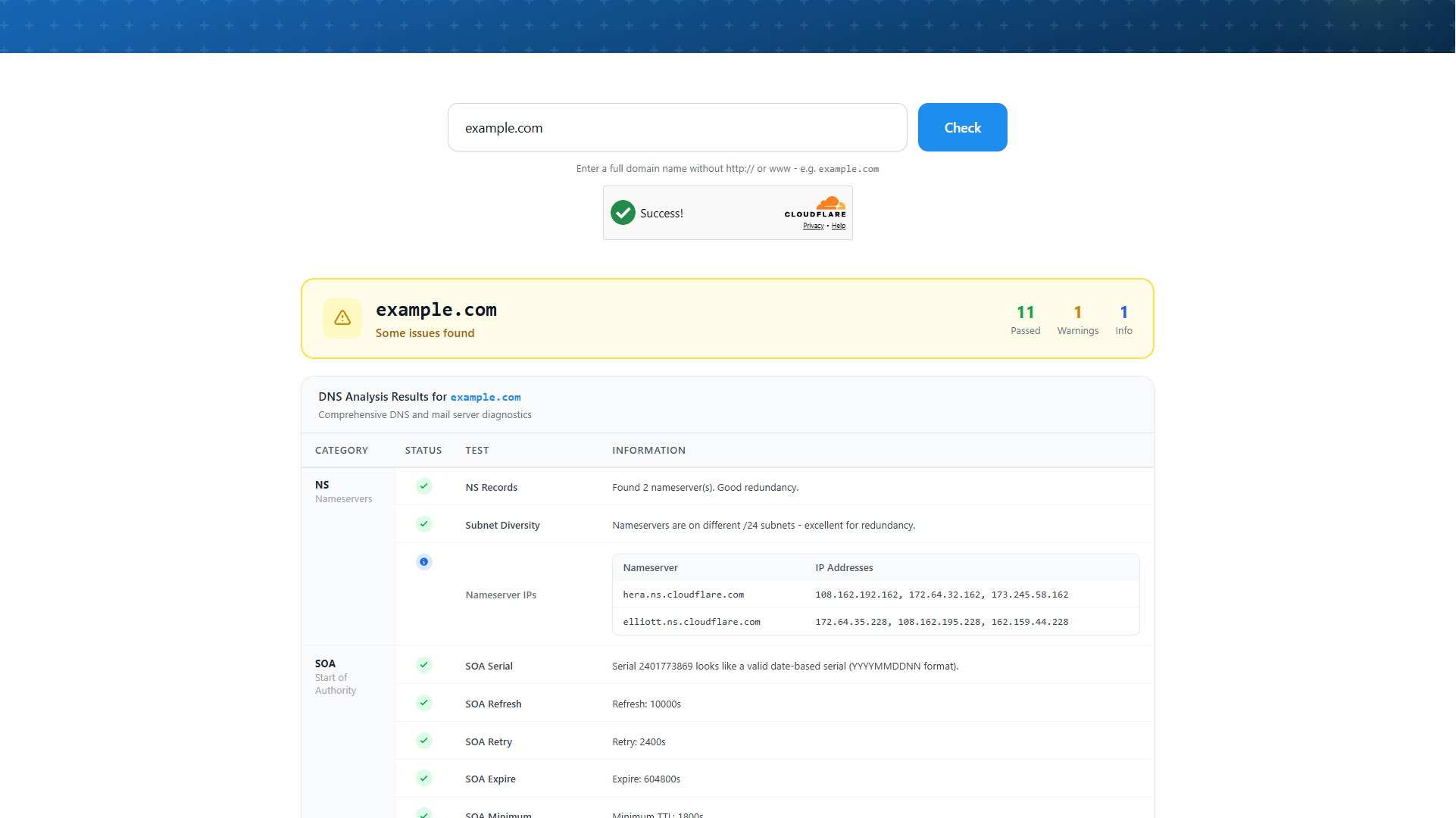
WhoisExtractor's free DNS Health Checkup Tool runs a comprehensive audit of any domain's DNS configuration in seconds. Enter a domain name and the tool checks:
Mail delivery records:
- MX records - Are mail exchange records configured? Do they resolve correctly?
- SPF record - Has the domain published a Sender Policy Framework record declaring which servers are authorised to send email on its behalf?
- DMARC record - Is there a DMARC policy? What action does it specify for failing email (none, quarantine, reject)?
- DKIM - Are DKIM signing keys published?
Domain security records:
- CAA records - Has the domain restricted which certificate authorities are permitted to issue SSL certificates for it?
- DNSSEC - Is DNS Security Extensions signing enabled?
- Registry locks - Are clientDeleteProhibited, clientTransferProhibited, and clientUpdateProhibited EPP status codes set?
Website and infrastructure:
- A / AAAA records - Do the domain's main records resolve to an IP address?
- NS records - Are nameservers configured and responding?
- Redirect behaviour - Does
http://redirect correctly tohttps://?
No account is required. The tool is free and works on any domain.
Common DNS Problems and What They Mean
Missing or broken MX records
If a domain has no MX record, or if the MX record points to a hostname that does not resolve, inbound email fails silently. Senders receive a bounce, but the domain owner often does not realise the problem exists until customers or partners report that emails are not getting through.
This is particularly common after migrations - a company moves email from one provider to another and the old MX records are left in place pointing at a decommissioned server.
No SPF record
Without an SPF record, any server anywhere on the internet can send email claiming to be from your domain. This makes your domain trivially usable for phishing campaigns - and because major email providers treat domains without SPF records as untrustworthy, it can also hurt deliverability of your own legitimate email.
A correctly configured SPF record looks like this in your DNS:
v=spf1 include:_spf.google.com ~all
Replace include:_spf.google.com with your actual email provider's SPF include record.
No DMARC record or a p=none policy
DMARC builds on SPF and DKIM to give domain owners control over what happens to email that fails authentication. A domain with no DMARC record or with p=none provides no protection - even if SPF is configured, failing email is still delivered to inboxes.
A p=reject policy tells receiving mail servers to reject email that fails authentication checks entirely. Moving from p=none to p=reject is one of the highest-impact changes an organisation can make for email security.
Missing registry locks
EPP status codes like clientTransferProhibited and clientDeleteProhibited are set by the registrar and prevent unauthorised transfers or deletion. Domains without these locks are vulnerable to social engineering attacks against the registrar's support team - an attacker convinces support to initiate a transfer, and the domain moves.
Auditing Domains You Do Not Own
The DNS Health Checkup Tool is valuable beyond your own domains. Security teams use it to audit the DNS configuration of:
- Client domains - Before or during a security engagement
- Vendor domains - Supply chain risk assessment
- Suspected phishing domains - Understanding whether a suspicious domain has email infrastructure set up (MX + SPF) is a useful signal when evaluating threat intelligence reports
- Competitor domains - Understanding their infrastructure setup
For full WHOIS registration details alongside DNS health data, use the WHOIS Lookup Tool on the same domain.
Using DNS Data at Scale
Individual domain checks work well for one-off research. Teams that monitor DNS health across a large portfolio of domains need bulk data. The WHOIS Database includes nameserver records for all domains in the database, which lets you analyse nameserver distribution, identify domains pointing at deprecated or misconfigured nameservers, and segment by DNS infrastructure at scale.
For organisations tracking DNS changes over time - useful for both security monitoring and brand protection - the combination of daily domain feeds and the archived WHOIS database provides a historical record to compare against.
Getting Started
The DNS Health Checkup Tool requires no account and no payment. Run it on your domain right now and check whether your DNS configuration is clean.
If you manage multiple domains and want to move beyond one-at-a-time checks, create an account and explore the database and API products. The cybersecurity use case covers how security teams integrate WhoisExtractor data into larger monitoring and investigation workflows.
For questions, the support centre is available to help.
